
Tiled ensemble#
This guide will show you how to use The Tiled Ensemble method for anomaly detection. For more details, refer to the official Paper.
The tiled ensemble approach reduces memory consumption by dividing input images into a grid of tiles and training a dedicated model for each tile location. It is compatible with any existing image anomaly detection model without the need for any modification of the underlying architecture.
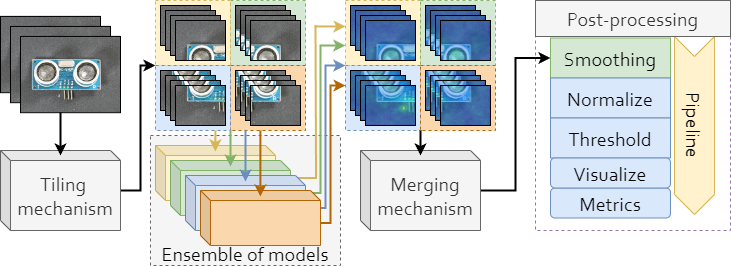
Note
This feature is experimental and may not work as expected. For any problems refer to Issues and feel free to ask any question in Discussions.
Training#
You can train a tiled ensemble using the training script located inside tools/tiled_ensemble directory:
python tools/tiled_ensemble/train_ensemble.py \
    --config tools/tiled_ensemble/ens_config.yaml
By default, the Padim model is trained on MVTec AD bottle category using image size of 256x256, divided into non-overlapping 128x128 tiles. You can modify these parameters in the config file.
Evaluation#
After training, you can evaluate the tiled ensemble on test data using:
python tools/tiled_ensemble/eval.py \
    --config tools/tiled_ensemble/ens_config.yaml \
    --root path_to_results_dir
Ensure that root points to the directory containing the training results, typically results/padim/mvtec/bottle/runX.
Ensemble configuration#
Tiled ensemble is configured using ens_config.yaml file in the tools/tiled_ensemble directory.
It contains general settings and tiled ensemble specific settings.
General#
General settings at the top of the config file are used to set up the random seed, accelerator (device) and the path to where results will be saved default_root_dir.
seed: 42
accelerator: "cuda"
default_root_dir: "results"
Tiling#
This section contains the following settings, used for image tiling:
tiling:
  image_size: [256, 256]
  tile_size: [128, 128]
  stride: 128
These settings determine the whole original image size, tile size, and tile stride.
Input image is resized to image_size and split into tiles, where each tile is of shape set by tile_size and tiles are taken with step set by stride.
For example: having image_size: 512, tile_size: 256, and stride: 256, results in 4 non-overlapping tile locations.
Normalization and thresholding#
Next up are the normalization and thresholding settings:
normalization_stage: image
thresholding_stage: image
Normalization: Can be applied per each tile location separately (
tileoption), after combining predictions (imageoption), or skipped (noneoption).Thresholding: Can also be applied at different stages, but it is limited to
tileandimage.
Data#
The data section is used to configure the parameters for the dataset used.
data:
  class_path: anomalib.data.MVTecAD
  init_args:
    root: ./datasets/MVTecAD
    category: bottle
    train_batch_size: 32
    eval_batch_size: 32
    num_workers: 8
    train_augmentations: null
    val_augmentations: null
    test_augmentations: null
    augmentations: null
    test_split_mode: from_dir
    test_split_ratio: 0.2
    val_split_mode: same_as_test
    val_split_ratio: 0.5
Refer to Data for more details.
SeamSmoothing#
This section contains settings for SeamSmoothing block of pipeline:
SeamSmoothing:
  apply: True
  sigma: 2
  width: 0.1
SeamSmoothing job is responsible for smoothing of regions where tiles meet - called tile seams.
apply: If True, smoothing will be applied.
sigma: Controls the sigma of Gaussian filter used for smoothing.
width: Sets the percentage of the region around the seam to be smoothed.
TrainModels#
The last section TrainModels contains the setup for model training:
TrainModels:
  model:
    class_path: Fastflow

  trainer:
    max_epochs: 500
    callbacks:
      - class_path: lightning.pytorch.callbacks.EarlyStopping
        init_args:
          patience: 42
          monitor: pixel_AUROC
          mode: max
Citation#
@inproceedings{rolih2024divide,
  title={Divide and Conquer: High-Resolution Industrial Anomaly Detection via Memory Efficient Tiled Ensemble},
  author={Rolih, Bla{\v{z}} and Ameln, Dick and Vaidya, Ashwin and Akcay, Samet},
  booktitle={Proceedings of the IEEE/CVF Conference on Computer Vision and Pattern Recognition},
  pages={3866--3875},
  year={2024}
}